
Mini Infinite Supernova

A few months ago, I posted "Infinite Supernova". But when I looked at the comments sections, I felt that while it really looks beautiful and is fun to build but it is time taking (we need to make 50 units before assembling) and people who are new to Origami may find it difficult.

So its time to get to the basic and in this project, I'll be making a mini and easy version of "Infinite Supernova" which requires only 5 units... Yes, you heard it right... and while we are on it, we'll also learn some basic terms used in origami folding.


Things We Need
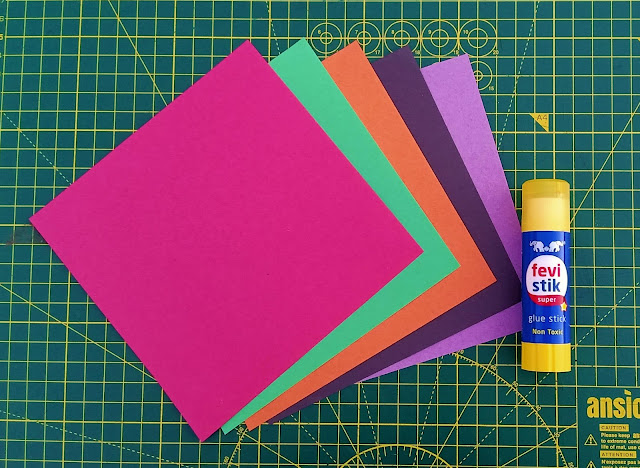
  • 5 Origami papers, 15 cm x 15 cm
  • Flat surface for folding
  • Paper glue

Building Block: Making a Unit (1/3)

  • Place the origami paper on a flat surface and fold the square paper vertically in half. Crease it well by sharpening it with a fingernail (Pic 1).
  • Now, holding the upper layer, fold it vertically in half like a valley (Pic 2).

This fold is known as Valley Fold because the crease is at the bottom and the paper is folded forward into itself, so that paper makes a "V shape" when unfolded.

  • Next, fold the bottom layer backward - vertically in half like a mountain (Pic 3).

This fold is known as Mountain Fold because the crease sits at the top and the paper is folded behind itself, and the paper makes an "inverted V shape" when unfolded.

  • Sharpen all the creases nicely with fingernail or gluestick's cap (Pic 4).
  • Now, valley fold the strip horizontally in half, crease it well and then unfold it (Pic 5).

Building Block: Making Unit (2/3)
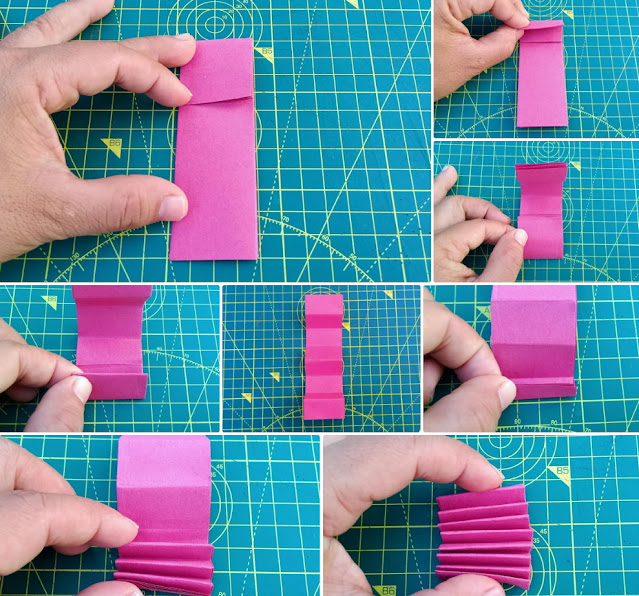
  • Valley fold-down the top edge of the strip to the center crease (Pic 1).
  • Again, valley fold-down the top edge of the strip to the center crease. Sharpen the crease well and then unfold it (Pic 2).
  • Repeat the above two steps for the bottom part (Pic 3 and 4).
  • When you are done, you should have a piece of paper that has an indentation going across it every half-inch (Pic 5).
  • Now, start at the bottom, by taking the bottom edge in your hands. Fold up to the indentation you made (Pic 6). Flip your rectangle over, so that it is still vertical, but face up. Take the bottom edge (the indentation you just folded) in your hands. Fold it up along the next indentation mark. Continue folding Accordion-style (alternate Valley and Mountain Fold) until you have made 8 folds in the paper (Pic 7 and 8).

Building Block: Making a Unit (3/3)

  • Hold-up the edge with 3 layers facing toward you(Pic 1) and separate the layer nicely.
  • Now, separate and pinch these layers together to form the letter "W" (Pic 2 and 3).
  • Next, flip over this "W" and separate the two layers apart to form the letter "M" (Pic 4 and 5).

Our Unit is ready (Pic 6). We need to make 5 such units for our Mini Infinite Supernova (Pic 7).


Assembly

Glue all the units together. Then arch the strand and glue the ends to make a circle.

That's it. We are done. It's time to play now!

Hold it from the side with both your hands. Move your hand in a downward or upward motion to unfold the inner layers. Adjust your hand as and when needed.

Enjoy as the Supernova as it explodes infinitely.


Comments

Popular posts from this blog

Rose Window with Tinkercad

I love to study ancient civilizations and architecture. Last summer I attended a 3D printing workshop, "Tinkering with Tinkecad" at my school. At the workshop, I learned how 3D printing is not only revolutionizing STEM learning but also aiding other streams like Geography and History. I learned how I can print out historical artifacts to examine and understand them much better. Here, I'm sharing how I used Codeblocks to create the Rose Window of the Abbey of Fiastra . Things We Need Computer Internet 3D software ( Tinkercad ) Computer mice, 3D printer, and filaments for printing(optional) Division For convenience, we will divide the Rose Window into 2 parts,   Inner Shell  and  Outer Shell . Inner Shell: Division and Identification The Inner shell of the Rose Window can divide it into 3 parts: Central Part:   made up of a solid cylinder at the center with hole cylinder with 12 cylindrical holes with the base pointing towards you. Middle Part:   is made up of ...

Bernoulli’s Mist Sprayer

  No doubt students learn more when they are mentally and physically engaged in the learning process, regardless of the subject they are studying, and when it comes to STEM education , hands-on experiential learning is an indispensable part of the learning process. In this hands-on activity, we will make a water sprayer using two straws, and experience Bernoulli’s Theorem . Category:  Physics Sub Topic:   Fluid Pressure Time Required : 20-30 min Difficulty:  Easy Things We Need 2 Straws (4 inches each) Insulation Tape Eraser Scissors A glass of water Assembly Pic 1:   Cut two insulation tape pieces and attach them to either end of both the straws. Pic 2:   While attaching the tape, make sure to leave some space from the end(4-5mm approx). Pic 3 : Tape the 1st straw(I used Green straw as 1st) to the eraser so that the straw is exactly aligned with the edge of the eraser. Pic 4:   Next, tape the second straw(I used Orange straw as 2nd) to the edge of th...

Space Invader With MakeCode

  Microsoft MakeCode is a framework for creating interactive and engaging programming experiences for those new to the world of programming. The platform provides the foundation for a tailored coding experience to create and run user programs on actual hardware or in a simulated target. MakeCode uses the blocks programming model to let the user learn coding concepts in a more tangible fashion. The blocks map directly to actual lines of code in a programming language. So, once a user has a sense of confidence and familiarity with how the blocks work, they can transition to coding more complex programs in the programming language itself. In this Instructable,  we'll develop  a simplified version of the classic ' Space Invaders ' game using Microsoft MakeCode. As opposed to the real game of Space Invaders game, our Invader(enemy) will be firing and moving horizontally across the top of the screen. The player will control a laser cannon by moving it horizontally across the ...