
Wheel Less Cardboard Cat

I love collecting old/broken toys. They are like goldmines. During the "maker's session" at my home, These toys are the best way to learn everything, from gears to circuiting.

I like challenging kids with the question "What can you do with this broken toy".

Here, I'm sharing a Remote Controlled Cardboard Cat that I recently finished with my kid. This is really a fun project and takes only 15 minutes to make.

So, Let's Start...


Things We Need:
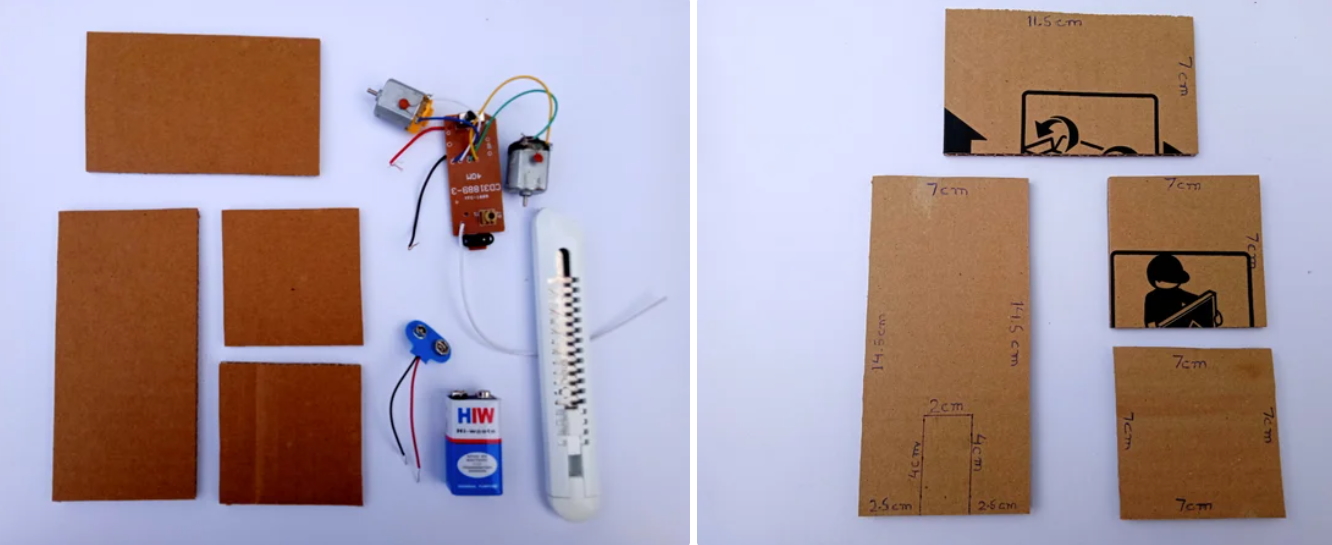
1) Cardboard pieces

14.5cm*7cm, 11.5cm*7cm and two 7cm*7cm

2) Stationary Knife or Scissor

3) One 9v Battery with cap

4) Hot Glue gun

5) Wireless receiver and transmitter from an old RC toy

6) Two DC motors


Marking and Cutting

Take 14.5cm*7 cm piece and make the markings according to the picture above. Use a cutter or a scissor and cut the marked lines. Remove the cut part. This will be the front part of the cat.


Gluing

Now, glue the 7cm*7cm piece at the back of the 14.5cm*7cm at a 90-degree angle using hot glue.


Adding a Wedge

Cut a 6cm*2.5cm cardboard piece, fold it into an equilateral triangle and glue it at around 6.5cm from the front of the cat. This Is where we will glue the DC motors.


Placing Motors and Receiver

Before you glue the motors, place the motor along the slanted side of the wedge. As shown in the picture above, make a mark where the rotating shaft of the motor touches the cardboard. Drill a hole using the tip of the cutter knife. Make sure that shafts of the motors come out from the other side of the cardboard so that the motor shafts makes contact with the ground.

Tip: If your cat isn't moving, Apply a tiny drop of hot glue over the motor shaft to provide friction.

Take the second 7cm*7cm cardboard piece and glue at a 90-degree angle, 4 cms from the front of the cat.

Now, glue the 11.5cm*7cm piece diagonally between the two square pieces.


Finishing Touches

Draw the facial features, paws, and glue ears and tail of your cat For better receiving of the signals from the remove glue the antenna of the receiver out on the cat's tail.


The Cat Is Ready to Play

Comments

Popular posts from this blog

Table Toy

  Tinkercad is well suited for students as it not only introduces us to CAD but also helps us to practice some mathematics lessons and therefore, I like using Scale while designing on Tinkercad. I'll be making a Mini Dustpan and Brush Toy for my study table.  This will help me to keep my study table clean from Rubber/Eraser dust and Pencil shavings. Things We Need Laptop or Computer Internet Connection Tinkercad Account 3D printer , filament and a paper cutter (if you are printing) Designing Dustpan Log in to your Tinkercad account and click  3D Design  (Left of your screen). Then click on   Create new design . Click and drag the   ruler   (Top right of your screen) to the   W orkplane . Keep the workplane snap grid measurement to 1.0 mm (Bottom right of your screen). Now, click on   Box   shape under   Tinkercad basic shapes   menu (Right of your screen) and drag it to the workplane. Change the dimensions of the box to 30...

STEAM Horse

You can find cardboard just about anywhere and for cheap, if not free. It’s versatile, easy to use, and an excellent teaching tool. At my home and school this the first thing that I like to give to the kids so that they get the opportunity to embrace STEM activities with a simple and inexpensive material: cardboard. In this project, I'll share how to make a Cardboard Horse and make it run with the help of Power Of Science, without any battery or wheels.  "This is my opening lines in the class before I start with this activity." Time Required: 45  min What:  Horse made out of cardboard which will move with the help of fluid pressure. Why:  Hands-on fun activity on liquid pressure . How:  Read-along... Things We Need 1) Cardboard 30cm*30cm 2) Glue Gun and Glue Sticks(2sticks)  3) X-ACTO knife   4) 2 10 ml Syringe   5) 1 foot of clear plastic tubing that fits the syringe tips  6) A pair of Scissors  7) 1 Toothpick piece  8) Straw, ...

Rose Window with Tinkercad

I love to study ancient civilizations and architecture. Last summer I attended a 3D printing workshop, "Tinkering with Tinkecad" at my school. At the workshop, I learned how 3D printing is not only revolutionizing STEM learning but also aiding other streams like Geography and History. I learned how I can print out historical artifacts to examine and understand them much better. Here, I'm sharing how I used Codeblocks to create the Rose Window of the Abbey of Fiastra . Things We Need Computer Internet 3D software ( Tinkercad ) Computer mice, 3D printer, and filaments for printing(optional) Division For convenience, we will divide the Rose Window into 2 parts,   Inner Shell  and  Outer Shell . Inner Shell: Division and Identification The Inner shell of the Rose Window can divide it into 3 parts: Central Part:   made up of a solid cylinder at the center with hole cylinder with 12 cylindrical holes with the base pointing towards you. Middle Part:   is made up of ...